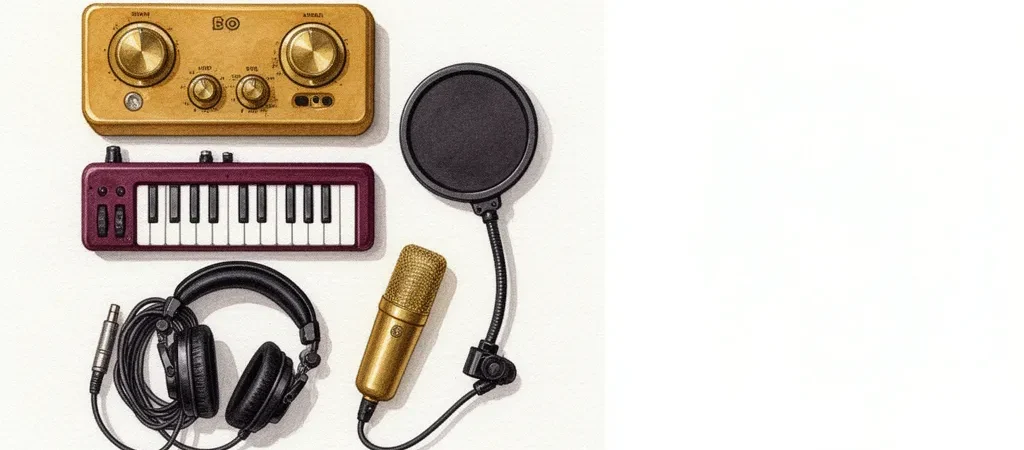
Search “home studio gift” and you get funneled into two traps: all-in-one USB microphones and suspiciously cheap condenser kits with a shock mount, a foam ball, and a scissor arm for $40. Both look like a recording studio in the product photos. Neither is what someone starting music production actually needs.
Here’s the one insight that lets a non-musician shop like an expert: a home studio is built around an audio interface — the small box that converts real-world sound into something a computer can record. Every good gift in this category either is that hub, plugs into it, or improves what comes out of it.
Once you see that hierarchy, the whole category snaps into focus. This guide is organized around it, from the $220 hub down to the $14 accessory that saves their first vocal take.
How we select these gifts
- Specialty retailers first: We start with what Austin-area specialty retailers actually stock — Switched On on East Cesar Chavez and the pro-audio counter at Guitar Center Austin both carry the Scarlett and Audio-Technica lines below. Stores whose business depends on return customers don’t stock junk. Where a niche isn’t covered locally, we check reputable national specialty retailers like Sweetwater instead.
- Community consensus: We cross-reference retailer inventory against what producers recommend in their own communities — r/audioengineering “first interface” threads and the r/WeAreTheMusicMakers gear wiki. Products that show up in both signals get the heaviest weight.
- Age and stage fit: This guide targets the adult beginner who has a computer and a musical urge but no signal chain — the gap is hardware, not talent. Their most common failure mode is buying gear in the wrong order, so every pick is sequenced to shorten time-to-first-recording without dead-ending.
- Budget range: Picks span $13.99 to $219.99, so the guide works whether you’re buying a stocking stuffer or the centerpiece gift.
- Skip-this guidance: Where a popular pick isn’t right for this specific stage — studio monitors, paid DAW licenses, USB condenser kits — we say so and explain why.
How We Pick: The 60-Second Mental Model
A first home studio has four layers, and they have a correct purchase order. The hub comes first: the audio interface. Inputs come second: a microphone and a MIDI keyboard, both of which plug into the hub or the computer beside it. Monitoring comes third: closed-back headphones. Accessories come last: the stand and pop filter that make the microphone usable.
Most abandoned home studios are the result of buying out of order. A microphone before an interface is a paperweight — XLR mics need the interface’s preamp and phantom power. Studio monitors before room treatment just play the room’s echo back at you. A paid DAW (the recording software) before learning a free one duplicates software the interface already bundles.
This also answers the question gift shoppers ask most: USB microphone or audio interface? A USB mic works on day one and dead-ends on day ninety — it can’t grow, can’t record an instrument and a vocal properly, and gets replaced entirely when the recipient gets serious. An XLR mic plugged into an interface is a chain where every link survives every future upgrade.
Every pick below passes three tests: it’s a consensus recommendation in producer forums, it belongs to a chain that doesn’t dead-end, and it keeps the hobby apartment-friendly. That last one matters more than people think — a hobby the neighbors can’t hear is a hobby that survives.
Focusrite Scarlett 2i2 (4th Gen): The Anchor Gift
If you buy one thing from this guide, buy this. The Scarlett 2i2 has been the default “first interface” answer for over a decade, and the 4th Gen version addresses the two mistakes every beginner makes: Auto Gain sets recording levels automatically, and Clip Safe rescues takes that would otherwise distort. Those aren’t gimmicks — ruined takes are why beginners quit.
Two inputs sounds limiting until you realize beginners record one source at a time. A vocal, then a guitar, then a keyboard — layered in software, not captured simultaneously. Two inputs is the correct number, not a compromise. If the recipient will genuinely only ever record one thing at a time, the Scarlett Solo trims the price by about $80.
The bundle also quietly solves the software question. It ships with Ableton Live Lite and a Pro Tools Artist trial, which means the recipient can record the day they open the box — a point we’ll come back to in the traps section.

Focusrite Scarlett 2i2 (4th Gen) USB Audio Interface
The interface is the one piece of a first studio you shouldn’t cheap out on, and the 2i2 is the piece everything else plugs into — the default recommendation in virtually every r/audioengineering “first interface” thread. Auto-gain and clip-safe features designed for people learning to set levels, plus a bundled software suite that gets a beginner recording the same day.
- 4th Gen preamps have 69dB of gain — enough to drive dynamic mics like the SM58 properly
- Auto Gain and Clip Safe remove the two most common beginner recording mistakes
- Includes Ableton Live Lite and Pro Tools Artist trial, so no separate DAW purchase needed
- Only two inputs — not enough for recording a full drum kit
- The Scarlett Solo does 80% of this for less if the recipient records only one source at a time
The Gateway Gift: Akai MPK Mini MK3
Here’s the safest single gift in this guide if you don’t know whether the recipient sings, plays guitar, or just wants to make beats: a small MIDI keyboard. It doesn’t record sound at all — it triggers the hundreds of virtual instruments already sitting inside any DAW, which means it works for every genre and every skill level.
The MPK Mini MK3 is the one forums recommend by reflex, and the reason is behavioral as much as technical. It’s small enough to live permanently next to the laptop, and gear that stays on the desk gets used. Gear that gets packed away gets forgotten. The eight drum pads matter too — tapping out a beat with your fingers is the fastest dopamine loop in music production, and it’s what keeps a beginner coming back on week three.
One honest caveat: the mini keys frustrate trained pianists. If the recipient has years of piano lessons behind them, a full-size 49-key controller — or the picks in our piano gifts guide — will serve them better.

Akai Professional MPK Mini MK3 MIDI Keyboard
For an adult beginner producing in a DAW, a small MIDI controller unlocks every virtual instrument in the bundled software, and the MPK Mini MK3 is the one forums recommend by reflex — 25 velocity-sensitive keys, real MPC drum pads, a footprint that fits next to a laptop. USB bus-powered, works the moment it’s plugged in.
- 8 backlit MPC drum pads make beatmaking immediately tactile and fun
- Ships with MPC Beats plus a Native Instruments sound package — usable with zero extra spend
- Small enough to leave on the desk permanently, which is what actually gets it used
- Mini keys frustrate trained pianists — a 49-key controller suits keyboard players better
- No pitch/mod wheels (uses a small joystick instead)
Closed-Back Headphones, Not Monitors: Audio-Technica ATH-M50x
“Should I get them studio monitors or headphones?” Headphones — and specifically closed-back headphones. Two reasons, one technical and one social. Technically, closed-backs seal against the head so the click track and backing music don’t bleed into the microphone while recording; open-back headphones leak sound by design and ruin vocal takes. Socially, headphones keep a 11 p.m. mixing session from becoming a neighbor dispute. Apartment-friendly monitoring is what makes this hobby sustainable.
The ATH-M50x is the forum-consensus pick at this price for a decade running: revealing enough to make real mixing decisions, rugged enough to live coiled on a desk, and efficient enough to run loud straight from the Scarlett’s headphone jack with no extra amplifier.
What about proper studio monitors, like the well-regarded Kali LP-6? They’re the right second-year upgrade — after the recipient has treated their room, because monitors in an untreated bedroom mostly reproduce the room’s own reflections. As a first gift, monitors are the classic wrong-order purchase.

Audio-Technica ATH-M50x Studio Headphones
Closed-back headphones are non-negotiable for recording — open-backs bleed the click track straight into the mic. The M50x is cited in thousands of forum threads and hits the sweet spot: revealing enough to mix on, rugged enough to live coiled on a desk, driveable straight from a Scarlett headphone jack.
- Excellent isolation for tracking vocals without click-track bleed
- Detachable, replaceable cables (three included) — common failure point solved
- Low impedance (38 ohm) runs loud from any interface or laptop
- Slightly hyped bass and treble — mixes need cross-checking on speakers
- Earpads run warm in long summer sessions
The Mic Decision: Shure SM58 or Audio-Technica AT2020
Both mics in this section cost $99, both are decades-deep consensus picks, and you should buy exactly one of them. The decision comes down to the recipient’s room, not their talent.
The Shure SM58 is a dynamic mic, which means it hears what’s directly in front of it and very little else — not the air conditioner, not the traffic, not the dog. Since beginners record in untreated bedrooms, that forgiveness is usually worth more than fidelity. It’s also famously indestructible, which makes it a genuine buy-it-for-life gift. Its one demand: healthy preamp gain, which is exactly why the 4th Gen Scarlett’s 69dB of gain earned a pro-list mention above.
The Audio-Technica AT2020 is a condenser — the detailed, airy “studio sound” — and it’s the cheapest condenser the forums actually respect. Below this price, the condenser market turns into noise-gate bait: mics that capture so much self-noise and room noise that the recording needs software surgery to be usable. If the recipient has a quiet space and records acoustic guitar, soft vocals, or voiceover, the AT2020 is the better ear.
Note that both are XLR mics. That’s not an inconvenience — it’s the point. Both plug into the interface, both survive every future upgrade, and neither becomes a drawer ornament the way a USB mic does.

Shure SM58-LC Dynamic Vocal Microphone
The anti-cheap-condenser pick: beginners record in untreated bedrooms, and a dynamic mic like the SM58 hears far less of the room (and the air conditioner, and the dog) than a $60 no-name condenser. Decades of forum threads endorse it as the mic you literally cannot break or outgrow.
- Forgiving of untreated rooms — rejects background noise a condenser would capture
- Famously indestructible; a genuine buy-it-for-life gift
- Doubles for live performance if the recipient ever plays out
- Needs healthy preamp gain — pairs best with a 4th Gen Scarlett or similar modern interface
- Less airy top-end detail than a condenser for quiet acoustic sources

Audio-Technica AT2020 Condenser Microphone
If the recipient wants the detailed “studio condenser” sound, this is the cheapest condenser the forums actually respect — the consensus is that below the AT2020 the condenser market turns into noise-gate bait. The legitimate entry point for vocals, acoustic guitar, and voiceover on a real XLR chain.
- Class-leading detail and low self-noise at the $99 price point
- Handles loud sources (144dB SPL) — works on guitar amps too
- XLR connection grows with the recipient’s interface instead of being a dead-end USB mic
- Hears everything — in an untreated, noisy room the SM58 is the safer gift
- Fixed cardioid pattern and no pad or filter switches
The Accessories They’ll Forget: Boom Stand + Pop Filter
Nobody puts a mic stand on a wish list, which is exactly why it makes a good gift — it’s the piece beginners consistently under-buy and immediately need. The On-Stage MS7701B is the industry-standard tripod boom, and the boom arm is the whole point: it lets a beginner position a mic in front of a guitar amp, above an acoustic guitar, or off-axis on vocals instead of clamping everything to a wobbly desk arm.
Pair it with the Nady MPF-6 pop filter — the $14 stocking stuffer that beginners skip until their first plosive-ruined take. Every “p” and “b” sound fires a burst of air at the mic capsule; the double nylon mesh stops it, and it protects a condenser like the AT2020 from breath moisture over years of use. Together the pair comes in under $50 and makes every mic in this guide actually usable.

On-Stage MS7701B Tripod Boom Mic Stand
Every mic in this guide needs a stand, and beginners consistently under-buy this piece. The MS7701B is the industry-standard tripod boom — its arm is what lets a beginner position a mic in front of a guitar amp or off-axis on vocals instead of clamping it to a wobbly desk arm.
- Boom arm enables proper mic placement on instruments, amps, and seated vocalists
- Standard 5/8″-27 threading fits the SM58 and AT2020 clips out of the box
- Folds flat and weighs about 5 lbs — stores behind a closet door
- Plastic leg housing is fine for home use but not tour-grade
- Heavy mics fully extended on the boom can drift without counterweighting

Nady MPF-6 Pop Filter
The stocking-stuffer of the guide and the accessory beginners skip until their first plosive-ruined vocal take. Double nylon mesh on a 16-inch gooseneck that clamps onto the mic stand — and protects the AT2020’s capsule from breath moisture too.
- Double-mesh screen filters plosives more effectively than single-screen budget filters
- Metal stabilizing arm keeps the gooseneck from sagging out of position
- Cheapest meaningful upgrade to vocal recording quality available
- Clamp is sized for stands and booms — it grips thin desk edges poorly
Skip These: The Three Home Studio Gift Traps
The most heavily marketed products in this category are the ones a beginner should avoid. The $40 no-name USB condenser kit — shock mount, scissor arm, foam ball, RGB lighting — is the biggest offender. It photographs like a studio and records like a webcam, and because it bypasses the interface entirely, there’s no path forward from it. It gets replaced, not upgraded.
The second trap is buying a DAW license. Nobody starting out needs one: the Scarlett bundles Ableton Live Lite and a Pro Tools trial, Macs ship with GarageBand, and Cakewalk and Reaper cover Windows users for free or nearly free. A $200 DAW gift duplicates software the recipient already has and locks them into an ecosystem before they know their workflow.
The third is studio monitors as a first gift — covered above, but worth repeating because monitors feel like the “serious” purchase. In an untreated apartment room, with neighbors on the other side of the wall, they’re the wrong order. Headphones first; monitors in year two.
What to skip
Skip the $40 no-name USB condenser kit with the shock mount and “studio arm” — it looks like a studio, sounds like a webcam, and dead-ends with no interface to grow into. Skip paid DAW licenses — the Scarlett bundles Ableton Live Lite and a Pro Tools trial, and GarageBand, Cakewalk, and Reaper cover beginners for free, so a $200 DAW gift duplicates what they already have. And skip studio monitors as a first gift — untreated apartment rooms plus neighbors make them the wrong purchase order; closed-back headphones come first, and monitors are the year-two upgrade.
If it helps to think in budget tiers, the interface-hub model gives you a clean ladder. Around $50 buys the stand and pop filter. Around $120 buys the MIDI keyboard or most of the headphones. Around $220 buys the hub itself. Around $400 buys interface, mic, and headphones — a complete first signal chain, and genuinely everything a person needs to record a finished song.
A gift from this list says something specific: you took their musical ambition seriously enough to learn how the gear actually fits together. That lands differently than a gadget picked off a bestseller list.
And if you’re stuck between two options, buy the hub. Everything the recipient acquires over the next five years plugs into that interface — which means nothing you gift alongside it ever becomes obsolete.